


Laser Engraver for Tumblers: A Complete Guide
 24-10-08
WHAT ARE YOU LOOKING FOR?
Search Across Products, Blog Posts, Support Content, And Resources.

Laser Engraver for Tumblers: A Complete Guide
24-10-08

Laser engraving is a practical way to turn everyday tumblers into personalized gifts, branded drinkware, promotional products, event merchandise, and repeatable product lines for small businesses. Names, logos, monograms, illustrations, and other artwork can be applied to compatible stainless steel, coated metal, glass, ceramic, and other tumbler surfaces.
However, choosing the best laser engraver for tumblers depends on more than the tumbler brand. The material, coating, shape, diameter, laser wavelength, rotary setup, and desired engraving effect all influence which machine and settings will work best.
Quick Answer: What Is the Best Laser Engraver for Tumblers?
For powder-coated stainless steel tumblers, a CO₂ laser with a compatible rotary attachment is one of the most practical choices because it can remove the coating to reveal the metal beneath. For bare stainless steel, a fiber or MOPA laser is better suited to direct metal marking and engraving. Glass and ceramic tumblers are generally better suited to CO₂ or selected UV systems. The best setup ultimately depends on the actual tumbler material, surface finish, shape, and engraving result you need.
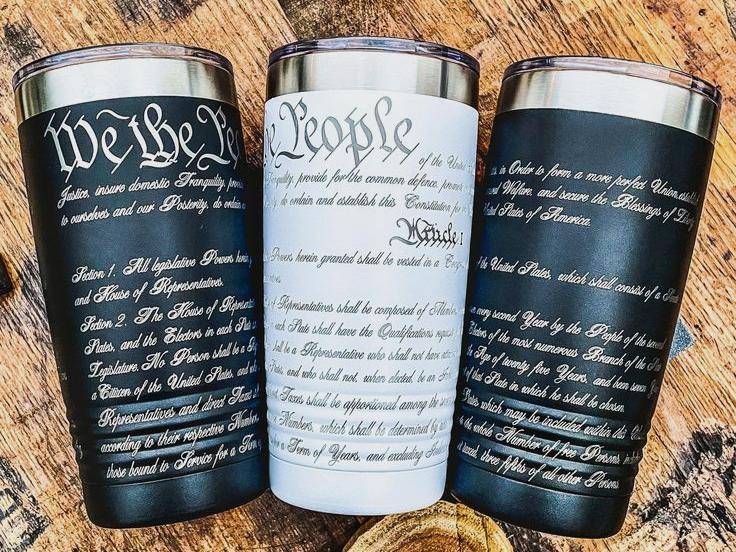
Laser engraving can create detailed designs by removing or modifying the surface coating on compatible metal tumblers.
Tumbler laser engraving is a complete workflow rather than simply a matter of choosing a powerful laser. You need a laser wavelength that matches the tumbler material, a rotary setup suitable for the tumbler shape, compatible software, and settings tested on the actual surface you plan to process.
Choose the laser source according to the tumbler surface rather than the product name alone. CO₂ lasers are commonly used for powder-coated metal, glass, ceramic, and other compatible surfaces. Fiber and MOPA lasers are better suited to direct marking and engraving on compatible bare metals such as stainless steel. Selected diode lasers can process some coated or painted surfaces, but their performance depends strongly on wavelength, coating, and material construction.
For a broader explanation of how laser wavelength affects material compatibility, see the laser wavelength guide.
A rotary attachment is strongly recommended for most tumbler engraving, especially for wide graphics, wraparound designs, tapered cups, and repeat production. The rotary turns the tumbler while the laser processes the curved surface, helping maintain more consistent alignment and focus.
Small designs may sometimes fit within a usable focal area without rotary movement, but a compatible roller or chuck rotary generally provides a more reliable workflow for cylindrical drinkware.
Material is one of the most important factors in tumbler engraving. Powder-coated stainless steel, bare stainless steel, anodized aluminum, glass, ceramic, and selected plastics interact with laser wavelengths differently. Even two tumblers that look similar may require different laser sources or settings because their coatings and surface treatments are different.
Your workflow typically involves design software and laser-control software. Artwork can be prepared as text, vectors, logos, patterns, or raster images, while compatible laser software controls the engraving parameters, positioning, and rotary configuration.
When choosing a machine, check support for the software, file formats, rotary controls, variable data, and other production features your projects require.
There is no single set of “best tumbler laser settings” because a tumbler describes the product shape, not the material. A powder-coated stainless steel tumbler, bare stainless tumbler, anodized aluminum cup, and glass tumbler require different processing strategies.
Settings should therefore be selected according to the exact material and desired result. For CO₂ processing, this may involve testing power, speed, focus, resolution, and passes. Fiber and MOPA workflows may additionally require frequency, pulse-width, hatch, and other marking parameters. Always test the actual tumbler before production.
You can use the Thunder Laser Settings Library as a starting reference, then follow our guide to finding the best laser material settings to optimize the actual tumbler material.
A tumbler laser engraver can turn compatible drinkware into personalized gifts, branded merchandise, event products, sports items, promotional goods, and repeatable product lines. The final appearance depends on both the design and the way the laser interacts with the tumbler surface.
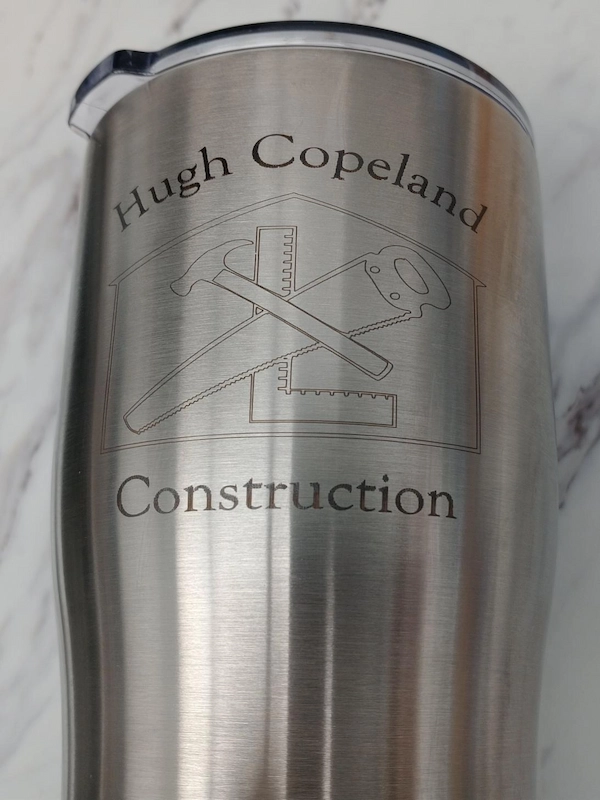
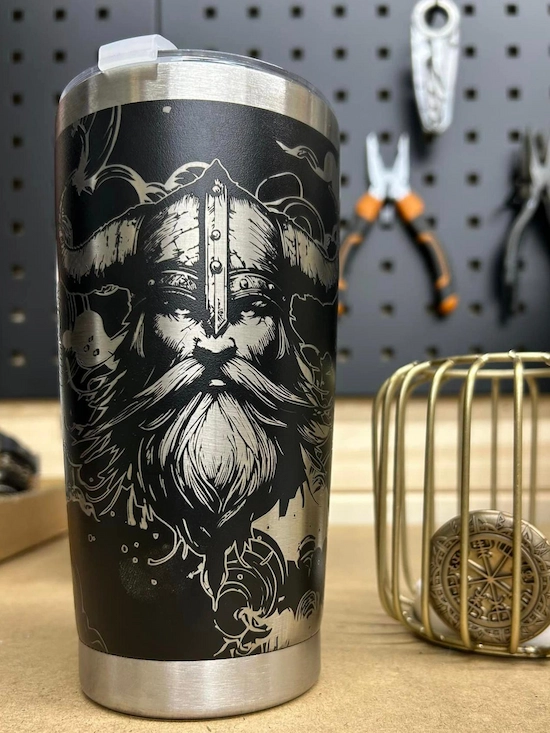
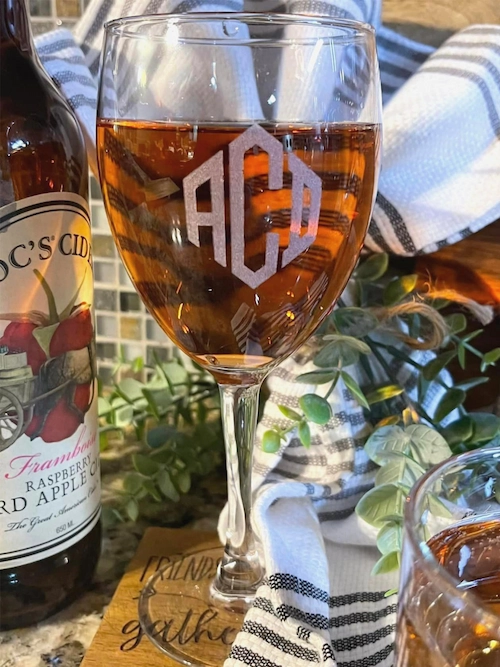
For more personalization and product ideas, explore the Thunder Laser Inspiration Library.
The best tumbler laser engraver is the machine that matches the surfaces, shapes, sizes, and production volumes you actually plan to process. Material compatibility should come first, followed by laser source, rotary configuration, machine clearance, software, extraction, and total setup cost.
Identify whether the tumbler is powder-coated, painted, anodized, bare metal, glass, ceramic, or another material. The surface construction determines both the laser source and the type of result you can expect.
Different laser wavelengths interact with tumbler materials differently. CO₂ lasers are especially useful for removing compatible coatings and engraving glass or ceramic, while fiber and MOPA lasers are designed for direct marking and engraving on compatible metals. Diode lasers may work on selected coated surfaces, but material compatibility should be tested carefully.
| Tumbler Surface | CO₂ Laser | Fiber / MOPA | Diode Laser |
|---|---|---|---|
| Powder-Coated Stainless Steel | Strong choice for coating removal | Suitable depending on coating and desired effect | Selected coatings may be compatible |
| Bare Stainless Steel | Generally requires a compatible marking compound for direct marking | Strong direct-marking and engraving choice | Generally not the primary direct-metal option |
| Anodized Aluminum | Strong choice for modifying or removing the anodized layer | Suitable for selected direct or surface effects | Selected surfaces may be compatible |
| Glass | Strong choice | Not the primary choice | Material and setup dependent |
| Ceramic | Strong choice for compatible surfaces | Material dependent | Material dependent |
A comparison of common laser types for different tumbler surfaces.
Roller and chuck rotary attachments solve different positioning problems. A roller supports the tumbler on rotating wheels or rollers, while a chuck grips the workpiece more directly. The better choice depends on the tumbler diameter, taper, handle, weight distribution, and required engraving area.
| Rotary Type | Best For | Main Advantages | What to Check |
|---|---|---|---|
| Roller Rotary | Straight cups, bottles, and many standard tumblers | Simple loading and good support for cylindrical objects | Roller contact, slipping, level, and diameter setup |
| Chuck Rotary | Selected tapered, small, irregular, or securely gripped cylindrical products | More positive workpiece holding and controlled rotation | Chuck clearance, grip position, handle interference, and workpiece balance |
A comparison of roller and chuck rotary setups for tumbler engraving.
Measure the tumbler diameter, height, handle position, and available engraving area before choosing a machine. The laser must provide enough vertical clearance for the tumbler and rotary assembly while still allowing the surface to reach the correct focus position.
Straight-sided tumblers are generally the easiest to rotate consistently because the diameter changes very little across the engraving area. Tapered tumblers require more careful leveling because the diameter changes along the cup. Handled tumblers introduce an additional clearance challenge because the handle must not collide with the machine or rotary during rotation.
A machine for occasional personalized gifts has different requirements from a tumbler production workflow processing dozens of repeated designs. Higher-volume businesses should consider loading time, rotary setup repeatability, engraving speed, fixtures, software workflow, and how quickly operators can move from one tumbler to the next.
Check whether the machine supports the software and rotary controls required by your workflow. Easy access to positioning, framing, rotary calibration, design scaling, and reusable job files becomes increasingly valuable as production volume grows.
Coatings, paints, inks, adhesives, plastics, and other surface treatments can produce different emissions when processed. Verify the complete material construction before engraving, use effective extraction, and review the materials unsuitable for laser processing guide when the coating or substrate composition is uncertain.
Rotary jobs should also be actively monitored so slipping, collision, incorrect rotation, or loss of focus can be stopped before damaging the tumbler or machine.
Budget for the complete engraving setup rather than the laser alone. Depending on your workflow, this may include the machine, rotary attachment, lenses, extraction, software, fixtures, training, and replacement or maintenance items.
The best tumbler for laser engraving is not determined by brand alone. Material, coating, surface finish, shape, and the type of laser you own matter more. Choose a tumbler whose construction is known and compatible with your laser process.
Powder-coated stainless steel is one of the most popular tumbler types for CO₂ laser engraving. The laser removes or modifies the colored coating so the underlying metal becomes visible, creating a strong contrast without requiring deep metal engraving.
Settings should be tuned to the actual coating. The goal is to use enough energy to remove the coating cleanly while avoiding unnecessary heating, residue, or discoloration of the exposed metal. Different coating colors and formulations may require different power and speed combinations.
Bare stainless steel is better suited to fiber or MOPA laser processing when direct metal marking or engraving is required. Depending on the laser source and parameters, the result may range from high-contrast surface marking to deeper material removal.
Fiber settings depend on the specific alloy and desired effect. Power, speed, frequency, hatch spacing, focus, passes, and MOPA pulse width can all change the final mark. Standard CO₂ systems generally require a compatible marking compound when direct marking on untreated bare stainless steel is the goal.
See the Thunder Laser metal material guide for more information about laser processing on metals.
Anodized aluminum can produce clean, high-contrast designs because the laser can modify or remove the anodized surface layer. CO₂ lasers are commonly used for this type of surface processing, while fiber lasers can also produce selected marking effects depending on the anodized finish and desired result.
Settings should be tested according to anodized color, layer thickness, finish, and laser wavelength rather than copied directly from stainless steel or powder-coated tumbler settings.
CO₂ lasers can create a frosted engraving effect on compatible glass tumblers. Glass composition, wall thickness, surface curvature, focus, and heat response all influence the result.
Glass settings should prioritize controlled energy rather than simply increasing power. Excessive heat can increase roughness, flaking, or chipping, so run a material test before engraving finished drinkware.
For more information, see the Thunder Laser glass engraving guide.
Compatible ceramic tumblers and mugs can be engraved or marked using CO₂ or selected UV systems. Results depend heavily on the ceramic body, glaze, coating, color, and surface finish.
Because glaze composition and thermal response vary, ceramic parameters should be developed specifically for the product. Excessive energy can increase discoloration, cracking, or chipping, so conservative testing is important.
See the Thunder Laser ceramic material guide for additional processing information.
YETI and Stanley are both popular choices for personalized drinkware, but the brand name alone does not determine engraving quality. Compare the exact model, coating, shape, handle clearance, diameter, and engraving area before choosing a laser or rotary setup.
| Consideration | YETI | Stanley |
|---|---|---|
| Material | Common models use stainless steel with coated and uncoated options | Common models use stainless steel with coated and uncoated options |
| Laser Choice | Choose according to the exact coating or bare-metal surface | Choose according to the exact coating or bare-metal surface |
| Shape | Varies by model; many designs provide relatively straightforward cylindrical engraving areas | Varies by model; tapered and handled designs require additional setup attention |
| Rotary Setup | Check diameter, taper, and engraving position | Check taper, handle clearance, balance, and rotary position |
| Best Practice | Test the exact model and coating before batch production | Test the exact model, coating, taper, and clearance before batch production |
A comparison of YETI and Stanley tumbler factors that affect laser engraving setup.
The exact workflow depends on your laser machine, rotary attachment, software, tumbler material, and shape. The following steps provide a practical overview. For a more in-depth Thunder Laser roller rotary setup and calibration tutorial, see How to Use Roller Rotary on Your Machine.
Confirm whether the tumbler is powder-coated stainless steel, bare stainless steel, anodized aluminum, glass, ceramic, or another material. Check coatings, paints, wraps, adhesives, and other surface treatments before selecting the laser source or parameters.
Measure the tumbler diameter or circumference and identify the usable engraving area. For tapered products, check how much the diameter changes across the design. Also measure handle clearance and any raised features that could interfere with rotation.
Choose a roller or chuck rotary according to the tumbler geometry. Position the tumbler securely and make sure it rotates without slipping, wobbling, or colliding with the machine.
For tapered tumblers, adjust the rotary or support height so the engraving area is as level as possible relative to the laser path.
Focus the laser on the actual engraving surface after the tumbler has been positioned on the rotary. If the cup is tapered or curved, prioritize the area where the most important part of the design will be engraved.
Enable the rotary workflow in the compatible laser software and enter the required diameter, circumference, steps, or rotary configuration for your machine. Incorrect rotary parameters can stretch, compress, or distort the design.
Before engraving at production power, verify the design position and rotary motion. A frame, outline, or low-power test can help confirm that the graphic is correctly positioned and that the tumbler rotates through the required area without slipping or collision.
Run the engraving using parameters tested for the exact tumbler material. Monitor the rotary throughout the job and stop the process if the tumbler slips, the handle approaches an obstruction, the engraving becomes misaligned, or the material reacts unexpectedly.
After engraving, allow the tumbler to cool and remove loose dust or residue using a cleaning method appropriate for the material. Mild soap and water may be suitable for many finished tumblers, while stronger cleaners should only be used after confirming compatibility with the remaining coating or surface treatment.
Inspect the finished design for coating removal, contrast, focus consistency, distortion, residue, and alignment before repeating the same setup for batch production.
Many tumbler engraving problems come from a mismatch between the material, laser settings, rotary calibration, or tumbler geometry. Check the process systematically rather than increasing laser power automatically.
| Problem | Common Cause | What to Check |
|---|---|---|
| Coating is not fully removed | Insufficient energy or incorrect focus | Test power, speed, focus, passes, and the actual coating formulation |
| Exposed metal looks dark or burned | Excess heat or residue | Reduce unnecessary energy, adjust speed, and review cleaning method |
| Design is slanted | Tumbler or rotary is not level | Level the tumbler and verify rotary alignment |
| Graphic is stretched or compressed | Incorrect rotary diameter, circumference, or calibration | Recheck rotary settings and tumbler measurements |
| Tumbler slips during engraving | Poor roller contact or unstable setup | Adjust roller position, support, grip, and workpiece balance |
| Tapered design becomes distorted | Changing diameter across the engraving area | Level the engraving zone, reduce the design area, or evaluate a different rotary setup |
| Double lines or ghosting appear | Workpiece movement, slipping, or rotary play | Check fixture stability and rotary movement |
| Heavy smoke or residue | Coating composition or excessive energy | Improve extraction and optimize the material-specific settings |
| Handle hits the machine or rotary | Insufficient clearance | Reposition the tumbler or use a rotary setup that provides suitable clearance |
| One side of the design is out of focus | Tumbler surface is not level or changes diameter | Adjust rotary height, focus position, or design placement |
A troubleshooting table for common tumbler engraving, rotary, focus, and positioning problems.
The best Thunder Laser for tumbler engraving depends primarily on the tumbler surface and production workflow. For most CO₂-compatible tumblers, the Bolt Series is our preferred choice because it combines professional RF CO₂ engraving with a rotary-focused workflow. Aurora is the better fit for direct bare-metal marking, while Titan Pro is designed for industrial businesses that need both CO₂ and MOPA processing.
| Series | Laser Source | Best Tumbler Application |
|---|---|---|
| Bolt Series | RF CO₂ | Powder-coated metal, glass, ceramic, anodized surfaces, and everyday tumbler personalization |
| Aurora Series | Q-Switched Fiber / MOPA Fiber | Bare stainless steel, direct metal marking, deep engraving, and advanced metal effects |
| Titan Pro Series | RF CO₂ + MOPA Fiber | Industrial mixed-material tumbler and product production |
A comparison of Bolt, Aurora, and Titan Pro for professional tumbler engraving workflows.
For powder-coated stainless steel tumblers, glass, ceramic, anodized surfaces, and other CO₂-compatible drinkware, the Bolt Series is our primary recommendation for professional personalization and small-to-medium production.
Key Specifications
The magnetic rotary tray is especially valuable for tumbler businesses because it simplifies rotary installation, positioning, and switching between flat and cylindrical jobs. Instead of treating the rotary as an occasional accessory, Bolt provides a more convenient workflow for shops that regularly move between tumblers, bottles, cups, and standard engraving projects.
Its RF CO₂ source is also well matched to the engraving-heavy nature of tumbler personalization, where names, logos, monograms, graphics, and repeated custom designs are more important than heavy cutting. The combination of rotary convenience and high motion performance makes Bolt a particularly strong fit for personalization studios and small businesses.

When the goal is to mark or engrave compatible bare stainless steel and other metal tumblers directly, the Aurora Series is the better choice.
Key Specifications
Aurora Fiber is well suited to everyday metal personalization such as names, logos, serial numbers, QR codes, and product identification. Its camera, autofocus, and positioning workflow also makes repeated setup more convenient when operators regularly change tumbler designs or engraving positions.
Choose Aurora MOPA when the tumbler product line requires more advanced processing, such as deeper engraving, greater material removal, high-contrast black marking, selected stainless steel color effects, or wider pulse-control flexibility. MOPA's value is not limited to color marking; it provides more control over both surface effects and demanding metal engraving processes.

The Titan Pro Series should be considered when tumbler engraving is only one part of a larger industrial production workflow that needs both CO₂ and direct metal processing.
Key Specifications
Titan Pro's main advantage for this application is its dual-laser architecture. The RF CO₂ source can support compatible coated and non-metal drinkware, while the MOPA fiber source handles direct metal marking and more advanced metal engraving in the same industrial platform.
For a typical personalization shop, this capability may be more than necessary. Titan Pro becomes valuable when tumbler production is part of a high-mix industrial operation where throughput, mixed materials, and reducing workflow changes between separate laser systems justify the larger platform.

The best laser engraver for tumblers depends first on the tumbler material and surface. CO₂ lasers are especially practical for powder-coated metal, glass, ceramic, and other compatible surfaces, while fiber and MOPA lasers are better suited to direct marking and engraving on bare metal.
Tumbler geometry matters just as much as laser power. Straight, tapered, and handled products may require different rotary setups, machine clearance, focus strategies, and calibration. Instead of searching for one universal tumbler setting, test the exact material, coating, shape, and engraving effect you intend to produce.
If you are unsure which machine, rotary attachment, or laser source fits your tumbler workflow, use Thunder Laser Material Testing to evaluate the actual product before moving into repeat production.
Ready to Start Tumbler Laser Engraving?
Explore Thunder Laser machines for personalized drinkware, promotional products, and professional rotary engraving workflows.
Contact UsTalk To Our Experts Now!
Please leave your contact information so that we can serve you better.
LASER ENGRAVER FOR TUMBLERS FAQS
TAKE THE NEXT STEP WITH THUNDER LASER


 Stable & Consistent MachinesUnlimited ApplicationsRobust After-sales SupportFactory Direct Supply


